Liu, P., Puthusserypady, S., MacKenzie, I. S., Uyanik, C., & Hansen, J. P. (2025). EarEOG: Using headphones and around-the-ear EOG signals for real-time wheelchair control. Proceedings of the ACM Symposium on Eye Tracking Research and Applications – ETRA 2025, Article No. 8, pp. 1-16. New York: ACM. doi:10.1145/3725833. [PDF] [video]
EarEOG: Using Headphones and Around-the-Ear EOG Signals for Real-Time Wheelchair Control
Peichen Liu,1 Sadasivan Puthusserypady,1 I. Scott MacKenzie,2 Cihan Uyanik,1 and John Paulin Hansen1
1Technical University of Denmark, Denmark
{s222475, sapu, ciuya, jpha}@dtu.dk2York University, Canada
mack@yorku.ca
Abstract. We present EarEOG, a real-time wheelchair control system using around-ear electrooculogram (EOG) signals. Electrodes are placed in standard over-the-ear headphones to improve user comfort. By detecting around-the-ear signals for eye gestures and jaw clenching, EarEOG offers a non-invasive and intuitive approach to low-latency wheelchair control. We describe the methods for signal acquisition, as well as the algorithms used for signal processing and classification. The feasibility, robustness, and low latency of EarEOG were confirmed through two experiments. The algorithm demonstrated a classification accuracy of 94.1% for all motion signals, which further improved to 97.3% when personalized models were applied. To ensure stability, we examined electrode impedance and algorithm accuracy across multiple trials where participants operated simulated wheelchairs while wearing EarEOG. The results indicated that when electrode impedance was below 1 MΩ, all participants successfully controlled the simulated wheelchair. Furthermore, EarEOG demonstrated low latency, with recognition delays of less than 125 ms.
Keywords: Electrooculogram (EOG), Wheelchair control, Headphones, Gaze
CCS Concepts: • Human-centered computing → Empirical studies in HCI.
1. Introduction
Recently, there is an increase in the number of individuals diagnosed with severe physical disabilities due to conditions such as amyotrophic lateral sclerosis (ALS) [22], multiple sclerosis (MS), high paraplegia, spinal cord injuries (SCI) [15], and strokes. These conditions often lead to significant motor impairments, restricting independent mobility. However, many patients retain control over facial, eye, and jaw movements, which can be utilized in computing interfaces to enhance mobility.
This research focuses on individuals who can control jaw and eye movements, aiming to develop a wheelchair control system using biological signals to enhance independence and quality of life. Controlling electronic wheelchairs traditionally involves a joystick, which is challenging for individuals with severe motor impairments, such as tetraplegia. Advanced assistive technologies offer alternative control methods using gaze, voice, or biological signals to enhance the mobility and independence for these users. Various approaches are explored, including voice-based control [16], eye tracking [8], Electroencephalogram (EEG)-based [24], and Electrooculography (EOG)-based systems [12]. While effective, each method has limitations. Voice-based systems are unsuitable for users with speech impairments; vision-based eye tracking struggles in varying lighting conditions and requires extensive data processing, increasing hardware costs. Compared with traditional functions, EEGs record the brain's electrical activity with millisecond resolution, making them ideal for studying rapid neural processes. However, the low spatial resolution of EEGs presents challenges for identifying the precise location of electrical brain activity.
Like EEG, EOG offers a high temporal resolution, enabling precise recordings of the timing of eye movements. An example application is wheelchair control. Huang et al. [11] used a three-channel device to collect EOG to control a whellchair. The user viewed a screen with different arrows in a graphical user interface (GUI). Since the user was required to focus on the GUI, they could not observe their surroundings while driving. To address this, Choudhari et al. [3] used different blink durations for control commands. Although direct viewing of the surroundings was possible, the use of blink commands could be uncomfortable. Rusydi et al. [21] placed electrodes around the eye to classify up-down directions and blinks for moving, steering, and stopping, thereby achieving full wheelchair control. However, these traditional EOG, EEG, and other biological methods require electrodes around the eyes or wearing a complex EEG collection device, which may cause discomfort to users, particularly during prolonged use. Furthermore, traditional biological signal devices are cumbersome and require electrodes on the face, creating a perception that users are distinct from others, which can lead to stigmatization and social distress. Integrating traditional equipment with EOG signal acquisition presents opportunities for new applications using everyday wearable devices like glasses and headsets. Kosmyna et al. [13] combined EOG and EMG electrodes in glasses to monitor both EEG and EOG in real-time. Manabe and Fukumoto [14] designed a headset with four electrodes on the sides to monitor EOG signals. Ang et al. [1] used the commercial NeuroSky MindWave1 EOG headset for cursor control. Customized EOG setups are another method to collect EOG signals; these focus on specific electrode placements for designated tasks. For example, Bastes et al. [2] designed such a system using just three electrodes above the eye to classify movements for a speech-assistive communication system. Chugh et al. [4] introduced a method utilizing ear-IMU sensors for classifying different eye gestures, highlighting a promising research direction for alternative eye-tracking techniques. Based on these prior works we propose EarEOG, a system using EOG signals around the ear to detect eye movements and jaw clenching for wheelchair control.
This paper introduces EarEOG, a system using EOG signals around the ear to detect eye movements and jaw clenching for wheelchair control.2 One of the main benefits of EarEOG is its seamless integration into wearable devices like headphones, allowing for low-power signal acquisition that is unaffected by ambient light conditions. Furthermore, EarEOG enables hands-free interaction without requiring a computer interface, allowing users to stay fully focused on their surroundings while operating the wheelchair.
2 System Description
We now describe how EarEOG captures data and stores signals from eye gestures and jaw clenching, forming the basis for subsequent processes. We then use these signals and an offline system to train and evaluate machine-learning models to classify different movements. Once optimized, these models are used in a real-time system to detect and classify movements. The movements are used to control a virtual wheelchair, enabling real-time interaction.
2.1 Data Collection
2.1.1 Electrode Position. Six silver threaded conductive tapes without gel (dry) were used as the electrodes (see Fig. 5a and Fig. 5b). All electrodes are positioned around the ear, making it possible to integrate their placement in a headset or hearing aid. For example, the electrodes could be attached to the foam cushion of a typical headset, allowing for convenient and non-intrusive signal acquisition. The reference electrode is located in the opposite direction of the measuring electrode. The electrode for Channel 1 is placed behind the ear at the mastoid bone to assist in measuring and differentiating signals from various muscle regions. The electrode for Channel 2 is positioned above and behind the ear, near the temporal bone and muscle attachment points, allowing it to capture signals from the facial muscles and eyes while reducing interference from other muscle groups, ensuring signal stability. The electrode for Channel 3 is placed near the zygomatic arch in front of the ear, close to the facial muscles, to measure signals related to eye gestures and facial muscle activity. The ground electrode is placed below the earlobe or near the jaw to ensure signal stability and reduce noise interference. The reference electrode is positioned on the opposite side of the head, symmetrically aligned with Channel 3, to provide a stable reference signal. The sample rate is 250 Hz, so data are transferred to the host computer every 4 ms.
2.1.2 Eye Gesture Signal Collection. Our procedure requires participants to focus on a white circle in animation to capture different eye gesture signals. The animation shows a small white ball sequentially moving horizontally across five positions: center, left, center, far left, center, right, center, far right. See Fig. 1a. Participants were instructed to not move any other body part, including their neck, and not to anticipate the circle's next position. When the small white ball moves at a slight angle, its speed is 150 pixels per second, and when moving over a larger angle, the speed increases to 300 pixels per second. Each time the ball reaches a predetermined position, it pauses for 1.2 s before continuing its movement. With a screen resolution of 640 × 480, the ball takes 0.19 s to cover the small angle and 0.38 s to cover the larger angle. Participants sat 25 cm from a 26" (16:9) screen, maintained a straight posture, and kept their gaze fixed on the moving circle without moving their heads or anticipating the ball's next position. The five positions correspond to 26° left, 45° left, 0°, 26° right, and 45° right. Each animation iteration includes three sets of these movements. The speed of the circle's movement is based on Pierce's study, where horizontal saccades lasted between 30 ms and 50 ms, with speeds often exceeding 300° per second (Pierce et al., 2019). Therefore, a 26° movement takes 30 ms, and a 45° movement takes 50 ms.
2.1.3 Jaw Clenching Signal Collection. The collection of jaw-clenching data is also directed by visual instruction. A sizeable green circle appears in the centre of the screen. See Fig. 1b. While the green circle is visible, the participant clenches their jaw and continues to bite until the circle disappears. Each participant will perform seven instances of jaw-clenching during three rounds of data collection, providing 21 data sets per participant. During the tasks while collecting eye gestures and jaw clenching, participants were allowed to blink naturally. Unlike intentional eye blinking, natural eye blinks do not influence the EOG signal.

(b) 
Fig. 1. Signal collection. (a) White circle interface for eye gestures. (b) Green circle for jaw clenching.
2.2 Offline Analysis for Signal Pre-processing
There are two frequency bands in the EarEOG system: 0-10 Hz and 10-30 Hz. The first band is 0-10 Hz wherein the main components of eye gesture and jaw clenching are present. The shape of eye gesture and jaw clenching signals in this frequency band is shown in Fig. 2a and Fig. 2b. In the second band, 10 to 30 Hz, eye gestures have no discernible effect on the amplitude. The amplitude range remains constant at -10 μV to 10 μV. However, during jaw clenching, the amplitude range in the time domain notably increases, reaching 40 μV to 60 μV. This contrasts with the observed behavior during no-action and eye-gesture conditions. The jaw clenching and eye gesture signals in 10-30 Hz are shown in Fig. 3a and Fig. 3b.


Fig. 2. Demonstration of frequency band 0-10 Hz in Channel 3 (a) Jaw clenching. (b) Eye gesture.

(b) 
Fig. 3. Demonstration of frequency band 10-30 Hz in Channel 3. (a) Jaw clenching. (b) Eye gesture.
2.3 Offline Analysis for Feature Extraction
2.3.1 Signal Windowing. During machine learning, the signal is segmented using an overlapping window. Each window is 0.5 s long (125 sample points) with a 0.48 s overlap. This overlaps closely approximates the 0.496 s overlap in the real-time system (see Section 2.5.3), ensuring consistency between training and deployment. Additionally, the overlap was chosen to balance the KNN model's sensitivity to sample size with the need for robust performance
2.3.2 Features in 0-10 Hz. In the 0-10 Hz range, the eye and jaw classifications are characterized by amplitude changes in a small window, with the amplitude change of the eye movement smaller than jaw-clenching. In order to extract the feature in 0-10 Hz, the "difference between the first and last value in the window" is effective. The equation for the difference feature is
2.3.3 Features in 10-30 Hz. In the 10-30 Hz frequency band, there is a pronounced disparity between the jaw and eye movements, with the amplitude range in the time domain considerably larger than that of the eye gesture. However, no distinction is evident between the left and right eye gestures, that observation comes from the data-driven statistical conclusion (see Fig. 3). Therefore, in the 10-30 Hz range, the range of the time domain is employed. The equation for the range is
2.4 Offline Analysis for Machine Learning
2.4.1 Partitioning of Training Data and Test Data. Our procedure uses two cross-validation methods: personal K-fold validation and general validation, each with distinct data partitioning strategies. Personal K-fold validation: training and test data come from the same participant, with K-fold analysis ensuring no data leakage. General validation: training and test data are from different participants, such as using one participant's data for testing while training on the data from all other participants. Label division is also a key part of dataset handling, allowing for different signal analyses based on task-specific category combinations. Universal label divisions group similar eye gestures under common labels. For example, mid2left and right2mid are grouped as small angle to the left, while mid2right and left2mid are small angle to the right. Categories of interest are left, right, stop, and jaw clenching. This categorization results in states like small/large angle to the left/right, eyes and jaw still, and jaw clenching. Based on the control logic (See Fig. 4), we combine the small and large eye gestures; therefore, the classification task has four classes: two eye gestures (see right, see left), jaw-clenching, and stop.
2.4.2 KNN Algorithm. Two different models are trained based on two different data partitioning methods. See Section 2.4.1. Euclidean distance is selected for its simplicity, effectiveness in medium-dimensional spaces, and ability to differentiate data points. We used an interval test with an interval of 1 to 100 to identify the optimal K-value. For the general model, we used the mean of the optimal values. This resulted in a K-value of 37. For the personal model, each participant was assigned their individual optimal K-value.
2.5 Real-time System
2.5.1 Control State Machine. The state machine of the system is illustrated in Fig. 4. The entire system is in three sections: straight-line speed control, stop control, and turning control. During straight-line speed control, the wheelchair is operated by jaw-clenching. When the user clenches their jaw, the state of straight-line speed is flipped, either from 0 m/s to 1 m/s or from 1 m/s to 0 m/s. Turning control uses eye gestures. When the wheelchair is oriented towards the center, a rightward gesture of the eyes causes the wheelchair to turn right; when the eyes return to the mid position (i.e., the eye moves left), the wheelchair stops turning. Similarly, a leftward gesture of the eyes causes the wheelchair to turn left; turning stops when the eyes return to the midpoint (i.e., the eye moves right). Restoring the default state addresses errors because the system cannot capture every eye gesture or jaw-clenching. Therefore, jaw-clenching is employed to restore the default setting. During wheelchair driving, the system restores the wheelchair to a midpoint position, a speed of 0 m/s, and a direction of travel that does not change.
2.5.2 Control Commands. The commands to control the wheelchair are determined by the classification results of a series of overlapping time windows. In this research, the duration of each overlapping window is 4 ms with each overlapping window given a classification result. For reliability, the system only issues a new control command to the wheelchair if 10 consecutive windows (40 ms) have the same classification results. After detecting that the jaw-clenching has ended, the system continues to output jaw-clenching signals for 100 ms to prevent the machine learning model from mis-classifying the muscle relaxing signal. Finally, during signal classification, a change signal is sent to the wheelchair simulator only when a signal different from the previous signal is detected.

Fig. 4. Wheelchair control state machine.
2.5.3 Real-time Signal Processing and Machine Learning. In the real-time system, the signal is filtered in each sample with the memory of the previous signal. Gesture classification uses an overlapping window of duration 500 ms with an overlap of 496 ms. After windowing the filtered signal, the system extracts the feature and uses the model from the offline training to classify the features. After getting the result, the classification result is transferred to the control command generator. In the real-time wheelchair control experiment, both the general model and the personal model are used to validate the performance of the system feasibility.
3 Experiment
3.1 Participants
The system feasibility experiment engaged 19 participants. The system robustness experiment engaged 8 participants. All participants in the robustness experiment had participated in the feasibility experiment. Among the participants, 4 were female, 15 were male, and they came from diverse professional backgrounds. The age of the participants ranged from 22 to 50 years. Participants were required to have normal control of their eye and jaw muscles. Wearing glasses was not a requirement or limitation. We made a verbal agreement with each participant to ensure that the participant's personal information and their signals would only be used for the experiment and would not be disclosed.
3.2 Apparatus
The foam in the EarEOG apparatus is shown in Fig. 5c and Fig. 5d. Signals are collected using six sliver-based dry electrodes positioned under over-the-ear headphones. Our lab designed the electrode; however, the details of the material are not described in this paper. Commercial silver threaded conductive tapes can be an alternative material for reproducing the experiment. The signal collection microcontroller is a Cyton Biosensing Board made by OpenBCI.3 The earEOG signal is derived from the potential difference between the reference and measuring electrodes. During the experiment, the screen was a 26-inch screen with a resolution of 1920 × 1080 pixels. We extend the work presented by Uyanik et al. [23], which is a Unity wheelchair simulator. The interface image for wheelchair navigation is shown in Fig. 6. As seen in part b, the space includes a living and eating area (left), a bathroom (top-right), and a bedroom (bottom-right).

Fig. 5. The EarEOG data collection electrodes.
 (b)
(b) 
Fig. 6. Overview of the wheelchair simulator. (a) View from inside. (b) Top view.
3.3 Procedure
3.3.1 Experiment 1: System Feasibility. The system feasibility experiment tested the feasibility of the whole system. The experiment proceeded in two phases: data collection (during eye gestures and jaw clenching) and real-time wheelchair control.
For the data collection phase, participants sat 25 cm from the display. They put on EarEOG and waited for the impedance to drop to between 100 kΩ and 900 kΩ, which normally takes 10-20 minutes. However, by wetting the ear area with water, the impedance can be reduced to 100 kΩ within five minutes and maintained during the testing. This occurs since moist skin establishes a connection with the dry electrodes faster. Once the impedance is stable, participants watched an animation, as described in sections 2.1.2 and section 2.1.3. The data collection phase lasted 10 minutes, including the time waiting for the impedance to decrease under 100 kΩ (5 minutes) and watching the data collection animation (5 minutes). After the data collection phase, we trained the general model and personal model for the real-time tasks. The general model is trained by using the signal from ten other participants, and the personal model is trained by using the signal from the participant self.
Then, participants used the system for real-time wheelchair control. They sat 50 cm from the display. We first introduced the operation of the wheelchair control logic to participants, then participants used the EarEOG to try to control the wheelchair in the simulator. Once familiar with the setup, they were given a task: Use the EarEOG apparatus with the trained general model and the wheelchair simulator to move the wheelchair from the start position to the coffee machine and then to the bathtub. And then using the personal model to control the wheelchair simulator to finish the same task. The positions of these locations are marked in Fig. 6b. A participant doing the experiment task is shown in Fig. 7.

Fig. 7. Real-time Experiment setup.
For movement control, specific instructions were given: "You can change the direction of the wheelchair by moving your eyes in the desired direction, and use a jaw clench to start or stop the wheelchair. If a mistake occurs, look forward and clench your jaw to reset the system to its default state, which is stopped and facing forward." While driving, the system collects the position parameters and stores them for follow-on analyses. The real-time wheelchair control phase lasted about five minutes.
3.3.2 Experiment 2: System Robustness. The second experiment followed the first experiment (system feasibility). The goal was to determine how the impedance between the skin and the electrode impacts system performance. Participants removed and re-fitted the EarEOG device and repeated the eye and jaw-clenching whereupon the impedance between the electrode and skin was logged. This was repeated three times. During the system robustness experiment, the participants only used the general model to drive the wheelchair to test the real-time performance. Testing for experiment 2 lasts about forty minutes per participant.
3.4 Performance Metrics
3.4.1 Validation Methods. Two validation methods are used in this paper: sample-based and event-based. For the sample-based performance metrics, the trained model assesses the outcome of each sampling window. Any errors that occur are recorded in the sample-based metrics. In contrast, event-based performance metrics tolerate errors. In this project, the following error situations are allowed: (i) the error point is not continuous, which means the error only occurs in one sampling window, and (ii) there is a time shift in the result, which means the window is not a perfect fit for the true label, but the time period is correct.
3.4.2 Offline Metrics. To validate offline performance, we measured precision, recall, F1-score, and accuracy, described as follows. In the multi-classification task, "positive instance" refers to a sample that belongs to a specific target category, while "negative instance" is a sample that does not belong to that category. Precision: The ratio of correctly predicted positive instances to all predicted positives, indicating the accuracy of positive predictions. Recall: The ratio of correctly predicted positive instances to all actual positives, reflects the model's ability to identify true positives. F1-Score: The harmonic mean of precision and recall, balancing false positives and false negatives. Accuracy: The proportion of correctly predicted instances (both positives and negatives) to the total instances, measuring overall prediction correctness.
3.4.3 Real-time Metrics. We gathered four measurements for real-time wheelchair control: Deviation: How closely (in meters) the user follows the reference trajectory or optimal path. The reference trajectory is established by averaging the wheelchair paths of five users who controlled it using a keyboard. Key presses "A" and "D" simulate left and right eye gestures, respectively, and "W" simulates a jaw-clenching. This averaged trajectory serves as a baseline for comparing the performance of other users. For each user point, the closest point on the reference path is identified, and the distance between these points is calculated. The sum of all distances is normalized by the number of points to obtain an average deviation. Mathematically, for user points U = {u1, u2, . . . , un} and reference points R = {r1, r2, . . . , rm}, where D is the average deviation, reflecting the user's path accuracy compared to the optimal path:
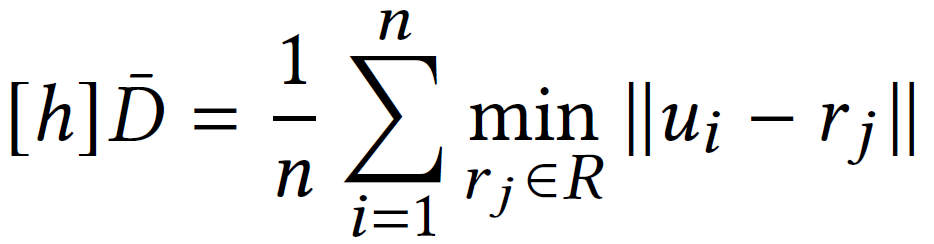 (3)
(3)
Time: The time to find the coffee machine or bathtub. Stop Count, Stop Time: The number of stops and the total time stopped while participants navigate the wheelchair to different apartment locations.
3.4.4 System Latency Calculation. In real-time systems, calculations inevitably introduce latency. This latency can be divided into three components: the system's response time to the signal, the human response time to the animation, and the calculation latency (both software and hardware). Consequently, the delay, based on the data collection animation, is the difference between the animation changes and the system's classification of different classes. Added to the system delay is the human reaction time. Figure 8 illustrates the calculation of system latency. The latency is determined by the difference between the control command change (red point) and the EOG signal change (green point). The blue dashed line represents the animation change time (when the white ball starts to move), and the green line shows the animation time plus the minimum human reaction time. The red line indicates the control command signal, adjusted to match the EOG signal for clear comparison. The system's eye movement delay is measured between the reaction point (green line) and the control signal change point (red line).

Fig. 8. Example system latency calculation using eye movement for Sub01.
This method calculates system latency for five participants during the data collection animation. The human reaction point is judged visually, so only clean signals, where changes are visible before filtering (green line), are analyzed.
4 Results
4.1 Data Collection
In the system feasibility experiment, data were recorded for each participant for 62 s, excluding non-movement states (no eye movement and relaxed jaw). Each movement lasted about 0.5 s on average. For eye movements, each participant performed 35 large-angle movements to the left, 35 to the right, and 35 small-angle movements in both directions. For jaw clenching, 21 signals were recorded per participant. After data cleaning, slight variations may occur. In the system robustness experiment, eight participants collected three sets of data, each set matching the scale of the first experiment.
Each set included 35 large-angle eye movements left and right, 35 small-angle movements in both directions, and 21 jaw-clenching signals. Data were collected at different times and with varying electrode impedance, which could lead to slight differences after cleaning. The results in each iteration were consistent with the first.
4.2 Offline Performance
Based on the offline analysis system, four scenarios were tested to evaluate the performance of the general model. The scenarios included two types of data – sample and event – See Section 3.4.1 and were conducted under both general and personal scenarios. Table 1 shows the average performance of the model in terms of precision, recall, F1-score, and accuracy across four different classes for each setting. The values in Table 1 are all above 90%, indicating that the model can classify not only when trained on the user's own data, but also when trained on data from other users, demonstrating flexibility across different participants. Figure 9 shows a plot of each class in the event-based validation.
Table 1. Offline Model Performance
Precision (%) Recall (%) F1-score (%) Accuracy (%) General, Sample 90.8 93.0 91.0 93.6 General, Event 94.5 94.3 93.8 94.1 Personal, Sample 96.3 94.0 95.3 97.3 Personal, Event 94.8 94.5 94.5 96.8

Fig. 9. Box plot for each class across different models using event-based validation.

4.3 Real-time Wheelchair Control
Figure 10 is an example trajectory to the bathtub, shown in green, representing the path while driving the wheelchair. The red line indicates the optimal path. The "x" marks show the stop positions while driving. Purple boundaries represent furniture, with rectangles indicating tables, and a gap showing the room participants were to enter.

Fig. 10. Trajectory example showing movement, stops, and room boundaries.
The performance results for 18 participants during wheelchair control are presented in Table 2. The results are compared between the general model and the personal model across two different scenarios: Drive the wheelchair to find the coffee machine and the bathtub. The results in Table 2 indicate that the overall performance is satisfactory across both tasks. The last two lines show the performance of each reference path compared to the average of the reference paths. Notably, the average deviation for the coffee machine task is higher than for the bathtub task, which we speculate is due to the presence of a table along the path to the coffee machine.
Table 2. Real-time System PerformanceNote: One participant was unable to complete the tasks, so the participant's results are not included in the table.
Deviation (m) Time (s) Stop Count Stop Time (s) Coffee - General Model 1.35 41.0 5.22 2.26 Coffee - Personal Model 2.05 52.0 5.33 2.16 Bathtub - General Model 0.97 61.4 6.89 2.03 Bathtub - Personal Model 0.92 70.9 7.11 2.15 Coffee - Keyboard Control 0.98 20.0 2.4 1.25 BathTub - Keyboard Control 0.25 31.5 4.4 1.44
4.4 Impedance Influence in Offline System
After testing the feasibility and performance of the system, we analyzed robustness by asking participants to take off and put on EarEOG to test the performance of the different impedances. Fig. 11 shows offline performance accuracy by impedance. "x" is accuracy for the offline signal, with red for the general model and blue for the personal model. The line is the average accuracy of the general and personal models. The "x" corridor shows the average impedance during the signal collection. The impedance in the table is the average of the four electrode impedances. For each electrode impedance, the impedance at the beginning and end is collected, with "x" in the figure showing the average of these two values. In the offline analysis, each personal model and general model was evaluated to find the relationship between impedance and classification accuracy.

Fig. 11. Relationship between impedance and accuracy.
4.5 Impedance Influence in Real-time Wheelchair Driving
To test the real-time performance of EarEOG, participants drove the wheelchair to again find the coffee machine and bathtub. The performance metrics of the real-time system also include the time and deviation of the trajectories between participants. To simplify the procedure and prevent mistakes due to fatigue, in the real-time analysis, participants only used the general model for the system robustness test. The relationship between real-time performance and impedance is shown in Table 3. As seen in the table, participants had difficulty controlling the wheelchair when the impedance was too high. An example is Sub04's Round 3 performance where the impedance was 17.5 MΩ and "Fail" was recorded for both the coffee machine and bathtub. In fact, all 14 instances of "Fail" in the table are coincident with impedance greater that 1 MΩ. This suggests that high impedance hinders correct commands, while lower impedance improves performance.
Table 3. Impedance and Real-time Performance per RoundNote: "Fail" means the system could not present the right command to the wheelchair.
Participant Impedance (MΩ) Performance Deviation (m) Round 1 Round 2 Round 3 Coffee Deviation Bath Deviation Sub01 5.00 0.31 0.17 Fail | 4.43 | 0.70 Fail | 0.70 | 1.02 Sub02 0.27 7.00 0.13 1.17 | Fail | 0.25 2.97 | Fail | 0.39 Sub03 7.50 0.34 0.34 Fail | 2.40 | 1.43 Fail | 1.21 | 0.19 Sub04 0.24 0.28 17.5 0.90 | 0.29 | Fail 2.62 | 0.54 | Fail Sub05 0.21 0.38 7.00 0.86 | 0.21 | Fail 0.91 | 0.66 | Fail Sub06 0.37 0.33 0.36 1.15 | 0.96 | 0.44 1.02 | 0.25 | 0.48 Sub07 0.48 0.17 2.00 1.35 | 2.88 | Fail 0.51 | 0.64 | Fail Sub14 0.34 2.00 0.12 1.98 | Fail | 2.86 1.05 | Fail | 0.40
4.6 System Latency
Five participants were tested to measure system latency. This required a clear signal for the observer to mark the signal change point; therefore, not every participant was tested. The average of these participants was 119 ms for eye movement and 120 ms for jaw-clenching movement. These five participant system latencies are shown in Table 4.
Table 4. Eye and Jaw Latency
Sub01 Sub02 Sub03 Sub04 Sub05 Mean SD Eye Movement Latency 128 ms 132 ms 108 ms 116 ms 112 ms 119 ms 9.26 ms Jaw Clenching Latency 136 ms 104 ms 108 ms 136 ms 116 ms 120 ms 13.6 ms
4.7 Comparison Among Functions
Table 5 compares the performance of several existing algorithms with the results from this research. It is important to note that the existing methods only classify eye movements, whereas our work addresses a more complex classification task that includes both eye and jaw movements. Because the beginning of the jaw-clenching signal has the same trend as the eye movement signal (See Fig 2), which will lead the mistakes in real-time application, this comparison illustrates the competitive performance of the proposed method, especially in personalized settings, showing that it is comparable to or exceeds the performance of existing algorithms for the given task.
Table 5. Comparison with Existing Algorithm
Algorithm Accuracy (%) Classification Task CNN (Ravichandran et al., 2021) 94.5 4 eye movements DTCWT (Dong et al., 2016) 95.6 4 eye movements SVM (Pal et al., 2014) 95.8 6 eye movements KNN* (O'Bard and George, 2018) 96.9 6 eye movements Our function, General 94.1 eye and jaw Our function, Personal 96.8 eye and jaw
4.8 Qualitative Analysis of User Experience
Task load was evaluated using the NASA-TLX scale [9], yielding an overall score of 3.69 (SD = 0.67). Among the six dimensions assessed, effort (4.76) and performance (4.59) received the highest ratings, indicating that participants felt a significant need to exert effort but were able to achieve satisfactory performance outcomes. Conversely, temporal demand (2.53) received the lowest rating, suggesting that participants experienced minimal time pressure during the task. The relatively low overall score suggests that the system is well-designed, imposing only moderate demands on users and making it intuitive and user-friendly.
5 Discussion
5.1 Result Discussion
The classification accuracy of the algorithm for all motion signals reached 94.1%, with a further improvement to 97.3% using personalized models. The system's stability was confirmed through multiple trials, where participants successfully operated the simulated wheelchair using EarEOG, provided that electrode impedance was kept below 1 MΩ. Additionally, EarEOG demonstrated low latency, with recognition delays of less than 125 ms. A significant challenge encountered was the time to achieve optimal electrode impedance. Participants had to wait for impedance levels to drop to a range of 100 kΩ to 900 kΩ, a process that typically took 10 to 20 minutes. However, by wetting the ear area with water, the impedance was reduced to the desired range within five minutes, allowing for quicker operation. Importantly, the ability to continuously measure impedance levels offers a substantial advantage. It allows the system to provide real-time feedback, advising them to apply additional moisture if necessary and offering estimates on how long it will take for the system to reach operational readiness. This feature enhances usability and minimizes downtime, improving the overall experience for users.
5.2 System Limitation and Future Work
During testing, some participants observed that eye movement control exhibited an imbalance in performance, with detection on one side more proficient than the other. This was not universal, however, as not every participant exhibited this issue to the same extent. While this did not result in a control error, it lead to a suboptimal user experience. This situation is likely caused by dominance of one eye over the other, known as ocular dominance [7]. Ocular dominance can influence how visual information is processed and prioritized by the brain, potentially affecting the sensitivity and accuracy of eye movement-based controls. Another point to consider is the potential impact of thick hair on electrode impedance, as noted in previous studies, such as Hou et al. [10], which could pose challenges in reliably capturing EOG signals around the ear. Although none of our participants had thick hair, and thus we encountered no related issues in our study, future work might explore solutions for users with denser hair. Investigating alternative electrode materials or configurations may improve signal quality across a more diverse range of users, enhancing both usability and inclusivity. Additionally, the participants in this study were all healthy individuals, and the system was tested in a simulated environment. Future research should focus on validating the system in real-world settings, especially with individuals who have mobility impairments, and consider variations such as the presence of thick hair.
Finally, a promising future topic is to extend EarEOG to detect additional movement types, such as correlating EarEOG signals with eye movement angles. While Favre-Félix et al. [6] suggest a potential relationship between in-ear-EOG signals and eye angles, applying similar methods to EarEOG could allow the system to control the wheelchair solely through different eye angles. Furthermore, a future version of this system could include a home facility interaction feature that activates when the user is within 2 meters of a device, such as a coffee machine or door opener. By pausing within this range for, for example, 3 seconds, the device could engage, allowing the user to interact via eye movements. A jaw clenching motion could signal the system to exit, after which it would remain inactive for, say, 10 seconds before reactivation becomes possible. These additions would enhance accessibility and independence for users unable to move their hands.
Privacy and Ethics Statement
The EarEOG system developed in this study controls the wheelchair through EOG signals. The collected biosignals will be anonymized in strict compliance with privacy protection regulations. The system is only enabled when the user actively interacts, avoiding unintentional monitoring of the user's daily behavior, thereby ensuring privacy.
References
[1] Andersen Ang, Zhiguo. Zhang, Yeung Sam Hung, and Joseph N. Mak. 2015. A user-friendly wearable single-channel EOG-based human-computer interface for cursor control. In Proceedings of the International IEEE/EMBS Conference on Neural Engineering – NER ’15. IEEE, New York, 565–568. https://doi.org/10.1109/NER.2015.7146685
[2] Anson Bastes, Siddharth Alhat, and M. S. Panse. 2018. Speech assistive communication system using EOG. In Proceesings of the Second International Conference on Intelligent Computing and Control Systems – ICICCS ’18. IEEE, New York, 504–510. https://doi.org/10.1109/ICCONS.2018.8663158
[3] Ajit Madhukerrao Choudhari, Prasanna Porwal, Venkatesh Jonnalagedda, and Fabrice Mériaudeau. 2019. An electrooculography based human machine interface for wheelchair control. Biocybernetics and Biomedical Engineering 39, 3 (2019), 673–685. https://doi.org/10.1016/j.bbe.2019.04.002
[4] Garvit Chugh, Suchetana Chakraborty, and Sandip Chakraborty. 2025. Unlocking Eye Gestures with Earable Inertial Sensing for Accessible HCI. In 2025 17th International Conference on COMmunication Systems and NETworks (COMSNETS). IEEE, 828–832.
[5] Enzeng Dong, Changhai Li, and Chao Chen. 2016. An EOG signals recognition method based on improved threshold dual tree complex wavelet transform. In Proceedings of the IEEE International Conference on Mechatronics and Automation – ICMA ’16. IEEE, New York, 954–959. https://doi.org/10.1109/ICMA.2016.7558691
[6] A. Favre-Félix, C. Graversen, T. Dau, and T. Lunner. 2017. Real-time estimation of eye gaze by in-ear electrodes. In 2017 39th Annual International Conference of the IEEE Engineering in Medicine and Biology Society – EMBC ’17. IEEE, New York, 4086–4089. https://doi.org/10.1109/EMBC.2017.8037754
[7] Brian Keith Foutch and Carl J. Bassi. 2020. The dominant eye: Dominant for parvo-but not for magno-biased stimuli? Vision 4, 1 (2020), 19 pages. https://doi.org/10.3390/vision4010019
[8] Anjith George and Aurobinda Routray. 2016. Real-time eye gaze direction classification using convolutional neural network. In Proceedings of the International Conference on Signal Processing and Communications – SPCOM ’16. IEEE, New York, 1–5. https://doi.org/10.1109/SPCOM.2016.7746701
[9] Sandra G. Hart. 1988. Development of NASA-TLX (Task Load Index): Results of empirical and theoretical research. Human mental workload/Elsevier (1988).
[10] Baosheng James Hou, John Paulin Hansen, Cihan Uyanik, Per Bækgaard, Sadasivan Puthusserypady, Jacopo M. Araujo, and I. Scott MacKenzie. 2022. Feasibility of a device for gaze interaction by visually-evoked brain signals. In 2022 Symposium on Eye Tracking Research and Applications – ETRA ’22. ACM, New York, 1–7. https://doi.org/10.1145/3517031.3529232
[11] Qiyun Huang, Shenghong He, Qihong Wang, Zhenghui Gu, Nengneng Peng, Kai Li, Yuandong Zhang, Ming Shao, and Yuanqing Li. 2017. An EOG-based human–machine interface for wheelchair control. IEEE Transactions on Biomedical Engineering 65, 9 (2017), 2023–2032. https://doi.org/10.1109/TBME.2017.2732479
[12] Landu Jiang, Cheng Luo, Zexiong Liao, Xuan Li, Qiuxia Chen, Yuan Jin, Kezhong Lu, and Dian Zhang. 2023. SmartRolling: A human–machine interface for wheelchair control using EEG and smart sensing techniques. Information Processing & Management 60, 3 (2023), 103262. https://doi.org/10.1016/j.ipm.2022.103262
[13] Nataliya Kosmyna, Caitlin Morris, Thanh Nguyen, Sebastian Zepf, Javier Hernandez, and Pattie Maes. 2019. AttentivU: Designing EEG and EOG compatible glasses for physiological sensing and feedback in the car. In Proceedings of the 11th International Conference on Automotive User Interfaces and Interactive Vehicular Applications – AutomotiveUI ’19. ACM, New York, 355–368. https://doi.org/10.1145/3342197.334451
[14] Hiroyuki Manabe and Masaaki Fukumoto. 2006. Full-time wearable headphone-type gaze detector. In Extended Abstracts of the ACM SIGCHI Conference on Human Factors in Computing Systems – CHI EA ’06. ACM, New York, 1073–1078. https://doi.org/10.1145/3342197.334451
[15] Kemal Nas, Levent Yazmalar, Volkan Şah, Abdulkadir Aydın, and Kadriye Öneş. 2015. Rehabilitation of spinal cord injuries. World Journal of Orthopedics 6, 1 (2015), 8. https://doi.org/10.5312/wjo.v6.i1.8
[16] Masato Nishimori, Takeshi Saitoh, and Ryosuke Konishi. 2007. Voice controlled intelligent wheelchair. In Proceedings of the SICE Annual Conference. IEEE, New York, 336–340. https://doi.org/10.1109/SICE.2007.4421003
[17] Bryce O’Bard and Kiran George. 2018. Classification of eye gestures using machine learning for use in embedded switch controller. In Proceedings of the IEEE International Instrumentation and Measurement Technology Conference – I2MTC ’18. IEEE, New York, 1–6. https://doi.org/10.1109/I2MTC.2018.8409769
[18] Monalisa Pal, Anwesha Banerjee, Shreyasi Datta, Amit Konar, D. N. Tibarewala, and R. Janarthanan. 2014. Electrooculography based blink detection to prevent computer vision syndrome. In Proceedings of the IEEE International Conference on Electronics, Computing and Communication Technologies – CONECCT ’14. IEEE, New York, 1–6. https://doi.org/10.1109/CONECCT.2014.6740337
[19] Jordan E. Pierce, Brett A. Clementz, and Jennifer E. McDowell. 2019. Saccades: Fundamentals and neural mechanisms. In Eye movement research: An introduction to its scientific foundations and applications, C. Klein and U. Ettinger (Eds.). Springer, Cham, 11–71. https://doi.org/10.1007/978-3-030-20085-5_2
[20] Thibhika Ravichandran, Nidal Kamel, Abdulhakim A. Al-Ezzi, Khaled Alsaih, and Norashikin Yahya. 2021. Electrooculography-based eye movement classification using deep learning models. In Proceedings of the IEEE-EMBS Conference on Biomedical Engineering and Sciences – IECBES ’22. IEEE, New York, 57–61. https://doi.org/10.1109/IECBES481792021.9398730
[21] Muhammad Ilhamdi Rusydi, Muhammad Abrar A Boestari, Riko Nofendra, Agung Wahyu Setiawan, Minoru Sasaki, et al. 2024. Wheelchair control based on EOG signals of eye blinks and eye glances based on the decision tree method. In 2024 12th International Conference on Information and Communication Technology (ICoICT). IEEE, 152–159. https://doi.org/10.1109/ICoICT61617.2024.10698650
[22] Guanzhong Shi, Jinxia Zhou, Kun Huang, and Fang-Fang Bi. 2022. Trends in global amyotrophic lateral sclerosis research from 2000 to 2022: A bibliometric analysis. Frontiers in Neuroscience 16 (2022), 965230. https://doi.org/10.3389/fnins.2022.965230
[23] Cihan Uyanik, Muhammad Ahmed Khan, Rig Das, John Paulin Hansen, and Sadasivan Puthusserypady. 2022. Brainy home: A virtual smart home and wheelchair control application powered by brain computer interface. In 15th International Conference on Biomedical Electronics and Devices. Scitepress Digital Library, Setúbal, Portugal, 134–141. https://doi.org/10.5220/0010785800003123
[24] Marley Xiong, Raphael Hotter, Danielle Nadin, Jenisha Patel, Simon Tartakovsky, YingqiWang, Harsh Patel, Christopher Axon, Heather Bosiljevac, Anna Brandenberger, et al. 2019. A low-cost, semi-autonomous wheelchair controlled by motor imagery and jaw muscle activation. In Proceedings of the IEEE International Conference on Systems, Man and Cybernetics – SMC ’19. IEEE, New York, 2180–2185. https://doi.org/10.1109/SMC.2019.8914544
-----
Footnotes:
1https://store.neurosky.com/
2EarEOG uses "around-ear" signal detection with sensors in the headphone cushion around the ear. This is distinct from "on-ear" which simply refers to a style of headphones that sit on top of a user's ear.
3https://shop.openbci.com/products/cyton-biosensing-board-8-channel