
Audio Visual Support Services (AVSS) facilitate the production and management of audiovisual services in classrooms, meeting rooms, and event spaces, and our Classroom Operations team provides in-class support.
**Please note, if you are looking to get a quote for a new AV system in a non-RAC space, please submit a ticket to askit@yorku.ca.
Featured Services
Overview
York courses in equipped rooms have free use of the installed technology. Courses in unequipped rooms may be charged small fees. Special requests, recordings or operators are also charged back to your department.
How do I access it?
It is recommended that faculty have a brief training session before the term starts if they are unfamiliar with classroom operations. Faculty or their admin staff should put in a request for a demonstration (a 5-minute instruction) via http://ceo.yorku.ca.
The prices apply to our regular operating hours Monday to Thursday, 8:00 AM to 10:00 PM, Friday, 8:00 AM to 7:00 PM and Saturday, 8:00 AM to 3:00 PM. For any questions or concerns about the pricing that you see in this page, please email askit@yorku.ca for clarification.
Video
| Equipment / Services Delivered | Category 1 (Courses) | Category 2 (Non-course) |
|---|---|---|
| VHS Playback | Free | $10.00 |
| DVD Playback | Free | $10.00 |
Computer
| Equipment / Services Delivered | Category 1 (Courses) | Category 2 (Non-course) |
|---|---|---|
| PC - UIT PC + Projector | $8.00 | $20.00 |
| PC - Instructor's PC+ Projector | $8.00 | $20.00 |
| Mac - Instructor's Mac + Projector | $8.00 | $20.00 |
| Instructor's PC + Projector + HDMI cable | $13.00 | $25.00 |
Audio Visual Projectors
| Equipment / Services Delivered | Category 1 (Courses) | Category 2 (Non-course) |
|---|---|---|
| Overhead Projector | Free | $10.00 |
| Carousel Slide Projector | Free | $10.00 |
Audio
| Equipment / Services Delivered | Category 1 (Courses) | Category 2 (Non-course) |
|---|---|---|
| Neck Microphone | Free | $5.00 |
| Small PA System | Free | $10.00 |
| Large Public Address System | $25.00 | $30.00 |
| Microphones for PA or Recording | $5.00 | $5.00 |
| Wireless Microphones for PA and recording | $15.00 | $20.00 |
| Operator (PA or Recording) | See below (*) | See below (*) |
Miscellaneous
| Equipment / Services Delivered | Category 1 (Courses) | Category 2 (Non-course) |
|---|---|---|
| Screen | Free | $10.00 |
| Demo (5 minutes of basic instructions) | See (**) | $20.00 |
| Nat Taylor Cinema | Free | $20.00 |
| Price Family Cinema | $50.00 | $60.00 |
| Webcam Conference | $10.00 | Quote |
| Late Order Surcharge (i.e. orders not placed 5 business days in advance) | $10.00 | $10.00 |
(*)
- If a full time staff operator is requested during regular business hours then there will be a full time Labour charge of $30/hr.
- If a full time staff operator is requested outside of regular business hours then it's Overtime Labour at $45/hr.
- If an operator is requested and not specifically a full time staff member, then we may provide a part time staff operator at the rate of $15/hr.
- Pickups and setups outside of hours of operation are subject to an additional labour charge; if you have any further questions or inquires please contact askit@yorku.ca
(**)
- Note that the first Demo is free, but the second and further subsequent Demonstrations will be charged $20 each.
- A $10 charge will be applied for late CEO orders ( i.e. orders not placed 5 business days in advance) .
Overview
A Hyflex classroom is equipped with technology that enables remote students to seamlessly participate in a course that is delivered on campus. The technology installed in the classrooms ensures the two-way engagement of all participants.
If you are teaching in a Hyflex space and require assistance, please contact us>>
Room is equipped with: a soundbar with an integrated microphone
Keele Campus Rooms
- McLaughlin College (MC): 101A
- Ross Building (R): N812, N814
- Vari Hall (VH) 1005, 1016, 1018, 1154, 1158, 2000, 2005, 2009, 2016
Room is equipped with: ceiling mounted auto tracking camera, audience ceiling microphones (where possible and denoted with an * below), teaching podium with two monitors, instructor wireless microphone, audio system to hear remote participants
Keele Campus
- Accolade West (ACW) 109
- Dahdaleh Building (DB) 0001*, 0005*, 0006*, 0007*, 0010*, 0014*, 0016*, 1004*, 1005*
- Health, Nursing and Environmental Studies (HNES) B10*, B11*
- Joan & Martin Goldfarb Centre for Fine Arts (CFA) 312
- Life Sciences Building: 103, 105, 106
- Ross Building (R) S104*, S105*, S156*, S501*, S536*
- Vanier College (VC) 135
- Vari Hall (VH) A, B, C, D
Glendon Campus
- York Hall (YH) A002*, A204*, A301*, A304*
Room is equipped with: ceiling mounted auto tracking camera, audience ceiling microphones, two large reference monitors at the back of the room, teaching podium with two monitors, instructor wireless microphone, audio system to hear remote participants
Keele Campus:
- Accolade East (ACE) 003, 005, 007, 009, 011, 013
- Accolade West (ACW) 004, 005, 006, 106
- Calumet College (CC) 106, 108, 211
- Life Sciences Building (LSB): 101, 107
- Vanier College (VC) 102, 105
Glendon Campus:
- York Hall (YH) A101, A102, A104, A201, A202, A302, 172, 247
1. Unlock the touch screen and cabinet using standard password
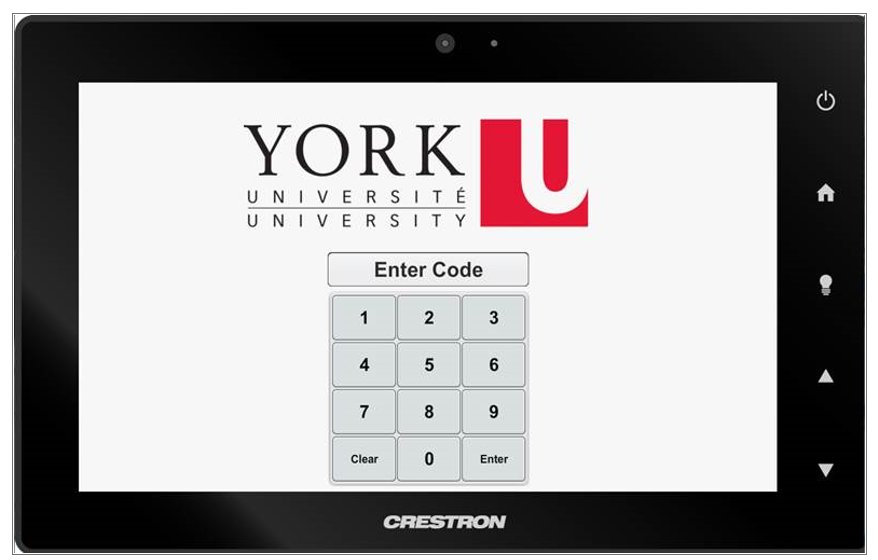
**Please note all Equipment for Remote Teaching is only accessible using the built in computer
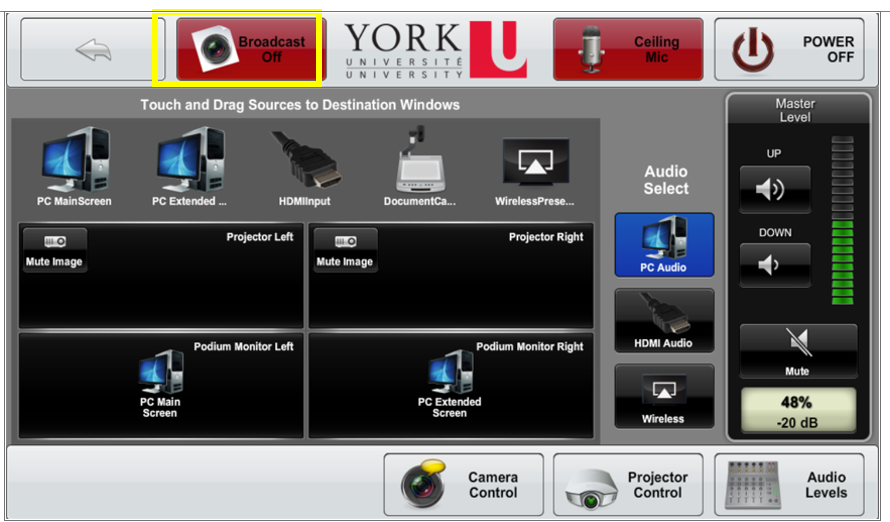
2. Login in to the computer using your PPY credentials.
3. Open Zoom and login to your account (use SSO/PPY).
4. Setup your Zoom meeting (layout and content) and start meeting.
4. Press "broadcast" button along the top to enable the remote camera and microphone(s) and start your zoom meeting.
** Ensure the PC audio is selected under “audio select”
** Lapel mics (where equipped) are also connected to the Zoom call
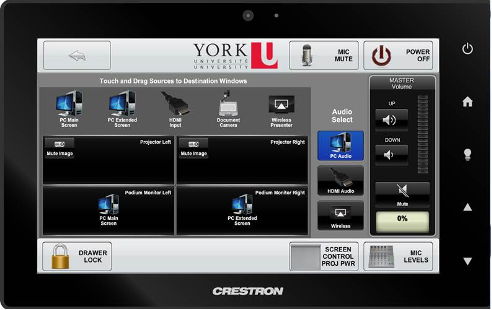
1. Unlock the touch screen and cabinet using standard password
2. Use the built in computer:
3. Hold the desired PC screen then drag to desired display
4. Ensure to select PC audio under Audio select options
5. Turn on the computer in the cabinet
6. Login using your Passport York account
How to Access it:
All centrally allocated rooms (RAC) are booked by the Registrar's office. If you would like to use one of the rooms listed on this page (or any other RAC rooms), please contact the Registrar's office at adhocs@yorku.ca.
Overview
Digital Signage is York University’s platform for displaying electronic content on public digital displays across campus. Content may include webpages, images, videos, event information, conference schedules, and other approved communications.
Digital displays are installed in almost 200 locations across Keele, Glendon, and Markham campuses. They are commonly found in public areas such as building entrances, hallways, service desks, student residences, and York-managed apartment entrances.
Display your content on existing digital signage
Set up a new digital signage display on campus
Connect a new digital display to York’s Digital Signage platform. Use this service if:
- You already own a compatible display and want it connected to York’s Digital Signage platform
- You'd like to purchase a new display and connect it to York’s Digital Signage platform
Standard Community Messaging

Overview
In order to better serve the York University community, the UIT Service Desk is making technical equipment available to all eligible York faculty and staff using their library card in line with our lending policy.
Available Tech
Webcam Kit: (**Please note this is only for faculty members that are currently teaching classes)
- The priority is only for full time faculty members and instructors that are currently teaching classes
- Full time staff members can also borrow the webcams (after the priority is met for faculty/instructors)
- Students and part time employees of the university will not be able to borrow this item
- You will be asked to provide your YUcard upon arrival
- You will be asked to complete a form upon arrival with your personal information for the loan
- The form will require you to provide your departmental budget number (only charged in the event of damage)
USB Mic: (**Please note this is only for faculty members that are currently teaching classes)
- The priority is only for full time faculty members and instructors that are currently teaching classes
- Full time staff members can also borrow the webcams (after the priority is met for faculty/instructors)
- Students and part time employees of the university will not be able to borrow this item
- You will be asked to provide your YUcard upon arrival
- You will be asked to complete a form upon arrival with your personal information for the loan
- The form will require you to provide your departmental budget number (only charged in the even of damage)
Look up your classroom to determine if you may need a microphone loan to use Panopto or Zoom>>
How do I Access It?
Pick-up and return is done at the Service Desk in the Steacie Building main hallway at room 107C.
Please see our location and hours of operation here>>
Overview
UIT builds and services technology in meeting rooms and event spaces.
How do I Access It?
Meeting rooms are owned by various departments and need to be booked directly through them. If you want to build out a new audio visual system, update existing technology, or for any maintenance request, please send your request to askit@yorku.ca.
Frequently Asked Questions
Classroom Technology FAQs
Hyflex Classrooms FAQs

Learn More
Not finding what you are looking for or need technical assistance? We are here to support you!