
Two-Factor Authentication (2FA) is required for all active student, staff, faculty, sponsored affiliate accounts and retirees to promote a safe online environment and help safeguard York University's information security and privacy. This is especially vital in the post‑pandemic era, where hybrid and remote models of work and study have coincided with a sharp rise in cyber‑crime and associated risks.
Helpful tips:
- Do NOT delete the Duo Mobile app after completing the 2FA Setup.
- Duo and Touch ID can only be used for web-based logins and will only work in Google Chrome 70 or later.
- Enable the 7-day "Remember Me" option by selecting the "Yes, this is my device" box at login to reduce how often 2FA is required on a particular trusted device.
- If you have multiple accounts and want to use the same authentication device, please read this FAQ.
✪ NOTE: As of February 2, 2026, Duo Mobile users may receive new in-app messages notifying them of a required software update. To learn more, see our post here.
What is 2FA?
Two-factor, two-step, or multi-factor authentication (MFA) is a security process that requires you to use two different authentication factors (methods) to verify your login. Think of your first factor as the lock on the front door of your house and the second factor as the door's deadbolt. The first factor is your Passport York password, and the second factor is a push notification, a code or call sent to your cellphone or a physical security key inserted into your computer. Two-factor authentication is the most effective way of protecting both your credentials and the resources you access with those credentials. With two-factor authentication, you can ensure that all your data remains safe, even if your password is compromised.
Why Do I Need This?
Two-Factor authentication adds an additional layer of protection to your accounts and the data you access through them. The easiest way for malicious hackers and phishers to access York's systems and data is by hijacking your account. With two-factor authentication, you are protecting yourself and your community against these sorts of attacks and ensuring each link in our security chain is strong.
How Does It Work?
- Enter your Passport York username and password
- Use one of the Duo Supported Devices to verify your identity
- You are securely logged in
When will I be prompted to authenticate with 2FA?
After you complete your 2FA Setup, you will be prompted to authenticate with 2FA every time you log in to Passport York web services and Office 365.
When will 2FA be activated?
Active Staff, Faculty and Students have been activated for 2FA as of April 2021.
New Students, Staff and Faculty members are activated on a daily basis.
Duo Mobile Compatible Devices
To use Duo Mobile, you will need either an Android or iOS device. As of April 16, 2026, the minimum supported OS versions will be iOS 17 and Android 12.
Helpful Resources
Download the Duo Mobile App for Android (version 12.0+) and iOS (version 17.0+)
UIT recommends enrolling your smartphone with the Duo app for ease of use and best experience. If you don't have a smartphone, you can order your Duo hardware token at the YorkU Bookstore. When completing your Duo token order, please use your York University email address.
Once two-factor authentication is activated for your account, you have 14 business days to complete your setup. If you've ordered a duo token, your grace period will be extended to 30 days.
Please note that the instructions on this page are intended for first-time setup of 2FA. If you have already completed your setup, and want to add additional devices, please stop and read the FAQ on "How to add a new device?"
To begin, please choose one of the instructions below.
Top Questions from York's Community:
If you switched/upgraded your phone and can no longer access Duo, please contact IT support services or your local IT support group for assistance with setting up your new device.
Have a new phone? Want to add a security key? You can easily add new devices using the Device Management Dashboard. If you upgraded your phone and you do not have the original device, please stop and read this FAQ on how to migrate the Duo Mobile app to your new phone.
Before you get started, if you are already signed-in to Passport York and/or enabled the "Yes, this is my device" setting, access https://mms.yorku.ca in Incognito or Private mode.
Setup a New Device
Step 1: Go to Manage My Services and log in to Passport York

Step 2: If you have the automatic "Duo Push" set, select "Manage devices".

Step 3: You will have to verify your identity using a previously known authentication factor before you are able to add or remove any devices.

Step 4: Once you have been verified, you will see the Device Management Dashboard, where you can select "Add a device".

Step 5: Choose the new device you want to add. In this example, we'll add another phone.

Step 6: Enter your phone number and click on "Continue". Make sure you have entered the correct number and select "Yes, it's correct".

Step 7: Install the Duo Mobile app on your new phone and click "Next".

Step 8: Scan the barcode with the app's built-in barcode scanner.

Step 9: The "Continue" button is clickable after you scan the barcode successfully. Your setup is now complete, click "Log in with Duo" to log in.

Step 10: The new phone is added and listed with your other devices. You can click Add another device to start the setup process again.
Yes, you can configure multiple devices on your Duo account. You must first verify your identity using a previously known authentication factor before you can manage your devices. Please see the FAQ above on "How to add a new device?" for detailed instructions.
Note: Passcode via text message is only available upon request and is NOT the preferred 2FA authentication method because of the increase in SIM card swap scams.
Before you get started, if you are already signed-in to Passport York and/or enabled the "Yes, this is my device" setting, access https://mms.yorku.ca in an Incognito/Private browser.
Setup Passcode via Text Message
Step 1: After entering your PY credentials, you will receive a Duo prompt. Click on "Other options".

Step 2: Select "Text message passcode".

Step 3: A one-time passcode will be sent to your registered phone number via SMS text messaging. Enter the passcode and click on "Verify". Please be advised that the one-time passcode cannot be re-used and will expire in 10 minutes.

Step 4: You should be redirected to the page below if you have successfully authenticated using passcode via SMS:

Before you begin, please note:
(i) Duo Mobile is supported on Android 11 and newer, and iOS 16 and newer. If you do not have a compatible phone, please check the other 2FA methods.
(ii) Duo Mobile is a free application. There is no fee or charge for downloading or installing the application.
(iii) You may need your password for your device’s App store or Google Play Store to download the application. Ensure that you know your password before you begin.
Download Duo Mobile
Step 1. Go to the App Store (iOS devices) or Google Play Store (Android devices) on your mobile phone.

Step 2. In the Search Bar, enter ‘Duo Mobile’ and then tap ‘Search’. Then select ‘Duo Mobile’ from the search results.

Step 3. Next to the application, tap on download to install Duo Mobile

Step 4. After Duo Mobile has been installed, tap on ‘Open’ to open the app.

Step 5. Tap ‘Allow’ to enable notifications from Duo Mobile. (You need to enable notifications from Duo, so that you can receive the push notifications and approve the Duo authentication requests)

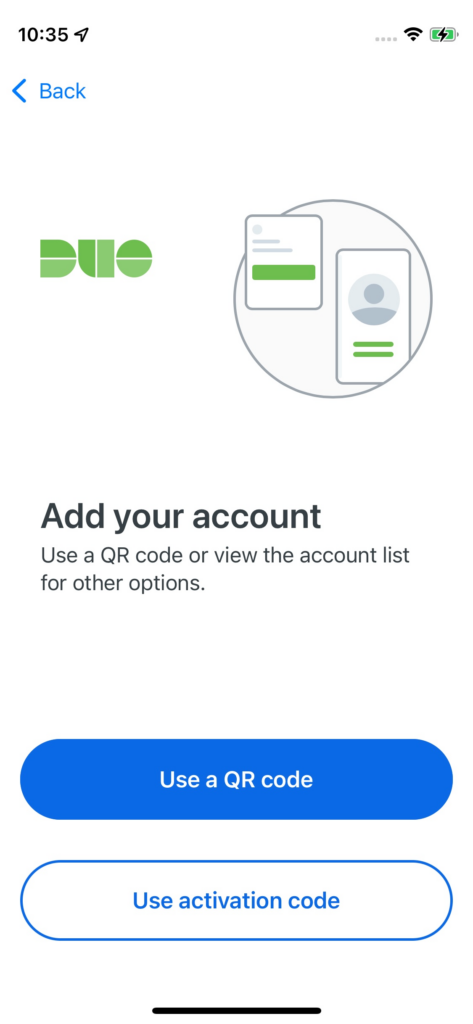
Step 6. You are now ready to add your YorkU account.
Additional FAQs:
- Who is required to use two-factor authentication (2FA)?
- Are there any location-based restrictions for Duo Service?
- Can I use my Android, iOS mail client after completing my Duo setup?
- Can I use Google Authenticator or other authenticators with Duo 2FA?
- Duo Mobile Privacy Information
- How do I Connect to Pulse Secure VPN with Duo 2FA?
- How to use the Duo Mobile app?
- I cannot log in with Touch ID.
- I cannot log in to VPN due to invalid password.
- I have multiple York accounts. Can I use the same 2FA device for them?
- Is there a monthly fee for using Duo 2FA?
- Remember Me Feature
- What are the elected Duo 2FA authentication methods of validating logins?
- What do I do if the Duo Push notifications do not appear on my smartphone?
- What if I don't have a smartphone?
- What is a Duo hardware token? How do I get one or get it replaced?
- What happens if I lose my phone?
- Which second factor is the most secure?
- What are the 2FA options if my smartphone is not compatible with Duo Mobile?
- How do I update the Duo Mobile App?
Didn't Answer Your Question?
We're here to help! Contact IT Support Services for assistance with any additional inquiries.
- I completed my 2FA Setup. Now, I cannot login to Passport York.
- I get a Duo error when launching Quick Assist.
- I stopped receiving push notifications on the Duo Mobile App.
- Issues with email on my smartphone/tablet.
- The Duo Mobile app does not show up in the App Store or the Playstore.
- The Remember Me setting is not working or the box is grayed out. How do I fix it?