Modes of delivery and engagement affect your course design, the decisions you make, and student learning.
Course design
Every course contributes to at least one program. Programs are designed using Program Learning Outcomes (PLOs) and courses are designed to support and achieve those outcomes using their own Course Learning Outcomes (CLOs). Fink’s (2003) Model for Integrated Course Design incorporates situational factors connecting to the realities of designing courses. Universal Design for Learning (UDL) is another design framework “…to guide the design of learning environments that are accessible, inclusive, and challenging for every learner.” (CAST, 2024). Combining these two frameworks offers a more inclusive outcomes-based course design model.
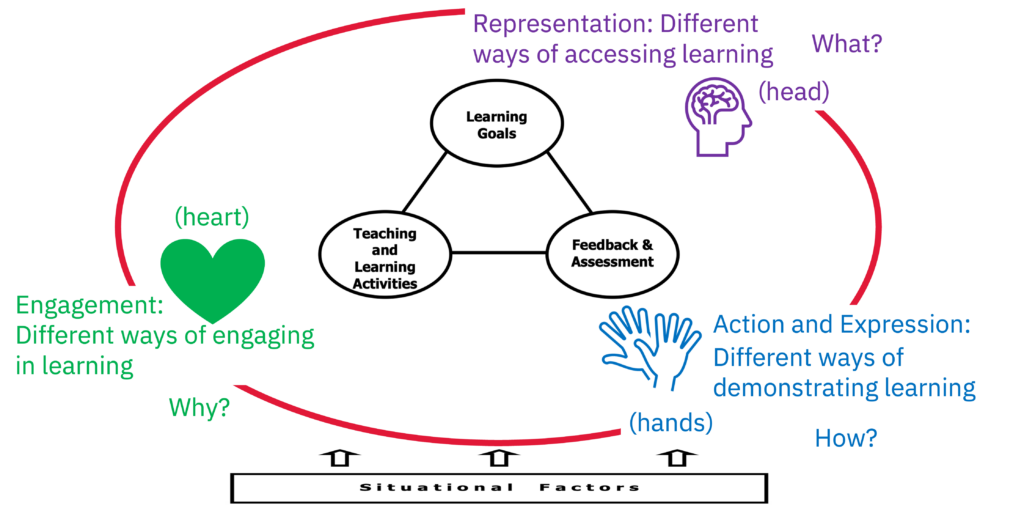
As recommended by Fink (2003), begin by identifying the situational factors for your course that will influence the decisions you make in course design (e.g. steps 2-4). A worksheet (Docx.) offers guiding questions to assist you in identifying your situational factors.
Examples of situational factors and additional resources
The Technology-Enhanced Learning page offers descriptions and guidance for choosing between the various modes of delivery at a program-level. Guidance for choosing a mode of learning at the course-level, is also available. Resources per modality:


Envision YU: Tools for student success
Envision YU is a pedagogical approach supporting students to gain the skills necessary to successfully transition into, through and beyond their university studies.
Supporting graduate students
The Faculty of Graduate Studies' Graduate Supervision Toolkit includes a wealth of resources to inform your course design to support all graduate students.

Assessment in large classes
A collection of resources, including a guide to large class assessments, and videos of York instructors sharing their practices.

Faculty-specific teaching and learning supports
Many Faculties at York have their own discipline-specific teaching and learning resources.

The SDGs-in-the-classroom toolkit
The toolkit will enable the pan-university interdisciplinary infusion of the Sustainable Development Goals (SDGs) into classrooms at York University.

Characteristics of York students
Knowing general characteristics of York students can assist you from the beginning of your course design.

This one-page handout offers strategies and resources for getting to know your students before and during the term.

A two-page handout that offers strategies for supporting your students and resources for you and for students from across campus.

A questionnaire with ten statements for instructors to rate in terms of their importance to their beliefs in teaching and learning that will guide instructors to identify with the corresponding pedagogies, with links to additional resources.

Teaching philosophies and teaching dossiers guide
A comprehensive resource by the Taylor Institute that offers guiding questions and worksheets, as well as extensive information for instructors to discover and document their teaching beliefs, values, goals, and experiences.

A resource by Laurier offering insights into the process of reflection and its connection to course design. The University of Waterloo's Tools for Reflecting on Your Teaching is an excellent complement offering strategies for feedback from students on your teaching.
Taking a backward design approach means beginning with the learning outcomes, that is, the expectations of student learning and achievement by the end of the course. This may or may not be your approach, so choose the resources below that connect to your teaching beliefs and processes.
Resources

What to do if you don't believe in learning outcomes? (coming soon)
There are many critiques of learning outcomes, and there are other ways to design courses. This handout offers alternatives and strategies to design courses that require learning outcomes without making them central to the design process.
What are effective learning outcome statements?
The video and handout define learning outcomes and how to write effective learning outcome statements. Additional tools:
- Bloom's taxonomy
- Fink's taxonomy (Docx.)

How to work with learning outcomes?
Whether you've written your own learning outcomes, or have been given learning outcomes, the question is, how to use them in your course design. This handout offers guiding questions and processes to design your course.
Worksheets
Worksheet for constructing course learning outcomes (Docx.) - a narrative based worksheet designed to assist with constructing course learning outcomes
Worksheet: Course learning outcomes (Docx.) - An alternate worksheet consisting of a table to build-up course learning outcomes, including an example to guide its use.
Activity: Course learning outcome statements (Docx.) - An activity sheet to evaluate and improve given, or constructed, learning outcomes.
The main purpose of assessment is to support and ultimately determine how well students achieve the learning outcomes. In backward design the learning outcomes guide the design of assessments, but this can be an iterative process. Assessment design can inform the creation and refinement of learning outcomes.
Resources

Mapping Assessment Paths in the AI Landscape
Wherever you stand on AI in your teaching — enthusiastic, cautious, or still working it out — we offer a shared framework for thinking clearly about assessment design.
The Teaching Commons has collected and created extensive resources for designing assessments, from examples of assessments to strategies for feedback and grading.
Multiple means of action and expression
This Universal Design for Learning (UDL) principle guides accessible assessment design. Consider how you may incorporate choices into your assessment design and support.
To balance the cognitive load and workload for both you and your students, aligning your teaching and learning activities with your learning outcomes and supporting your assessments will help you to focus on what is necessary and most important to you and your course. There are instructional frameworks that you may find useful to help organize your lessons:
- The BOPPPS Elements of Lesson Design
- Gagne’s Nine Events of Instruction
- Merrill’s First Principles of Instruction
Resources
Engagement strategies (coming soon)
The multiple means of engagement principle of Universal Design for Learning (UDL) guides the strategies of this resource.
Multiple means of representation
The Universal Design for Learning (UDL) principles guide accessibility of content, active learning, and engagement.
This resource offers ideas for various active learning strategies across modes of delivery to support different levels of learning.

Putting it all together: Course outline/syllabus resources
Once your course is designed you are ready to construct your course outline/syllabus to communicate your course design to your students.
- Academic Integrity Syllabus Statements
- Modes of Delivery Syllabus Statements (coming soon)
Looking for a different topic?