
International students must be accepted into the Co-op Program before they submit their proof. After completing the mandatory co-op information session and co-op application, eligible international students will be granted ‘conditional approval’ in the Co-op Program and receive a letter from our office to apply for your co-op work permit.
Information on how to submit the proof of Co-op Work Permit Application can be found below.
How to Submit the Proof of your Co-op Work Permit Application
Step 1
Log into the Experience York platform using your PPY credentials. In the Welcome Dashboard, click on "My Forms."

Step 2
Click on the action icon - the red circle featured at the bottom right-hand corner of the page.

Step 3
Click on "Submit A Form" from the available Actions.

Step 4
In the Category dropdown, select the "International Students - Submit proof of Co-op Work Permit Application" option.

Step 5
Answer the questions on the form and upload proof of your application.
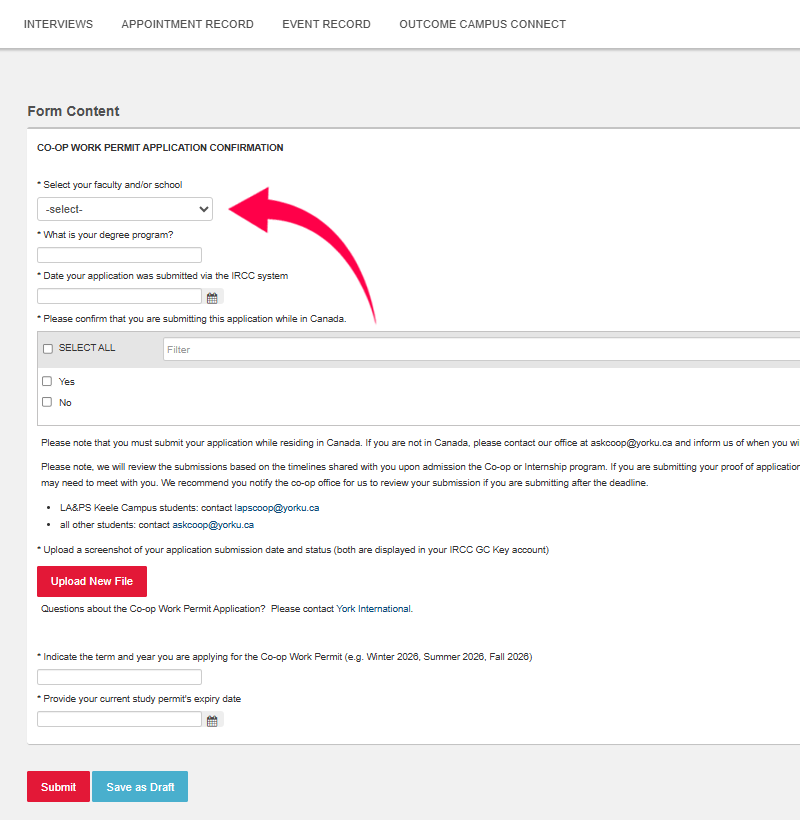
Step 6
Click "Submit" once you have answered all of the questions and have uploaded proof of your application to complete your submission.
